Import recipes
One recipe per record type: what the file needs, what the lookups match, and a sample file you can download. Then the order to import related data in a multi-step migration.
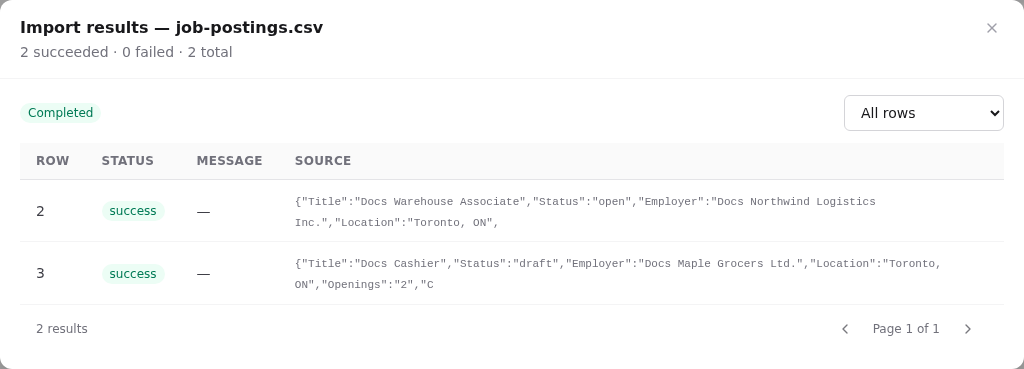
Every sample below was imported into a demo tenant with the wizard, in the order shown, with zero failed rows. The samples refer to demo staff (staff1@demo.orbit…) and sites (Downtown Office, East End Hub); swap in your own values.
Mapping steps are the same for every type. See the walkthrough. For every field of every type see Import field reference.
The import order
Lookups only find records that already exist, so import in dependency order:
 0. Settings: sites + definitions (statuses, types, programs…)   ← configure, don't import
 1. People ──► 2. Staff
 3. Clients ─────────────┬─► 4. Cases ──► 5. Follow-ups
                         └─► 6. Appointments (also needs staff)
 7. Events
 8. Employers ──► 9. Employer contacts
             └──► 10. Job postings ─┐
 11. Applicants (people/clients) ───┴─► 12. Job applications
| Step | File | Needs first |
|---|---|---|
| 0 | – | Sites exist (Settings → Sites); every status/type code you'll use exists (Settings → … definitions) |
| 1 | people.csv | – |
| 2 | staff.csv | People (by email) |
| 3 | clients.csv | Staff (for Assigned staff) |
| 4 | cases.csv | Clients, staff |
| 5 | follow-ups.csv | Clients, cases, staff |
| 6 | appointments.csv | Clients, staff |
| 7 | events.csv | – |
| 8 | employers.csv | Staff (for Owner) |
| 9 | employer-contacts.csv | Employers |
| 10 | job-postings.csv | Employers |
| 11 | applicants.csv | People or clients |
| 12 | job-applications.csv | Applicants, postings |
Tip: Save a template for each step the first time. A re-run or a second site's migration is then just Run from template × 12.
People and staff
A staff profile belongs to a person, so staff are a two-step import.
Step 1: People (people.csv)
First Name,Last Name,Email,Phone,Preferred Language
Docs Ines,Moreau,ines.moreau@example.org,416-555-0301,"English, French"
- Required: First name, Last name. Include Email: the staff step finds the person by it.
- Duplicates match on email.
Step 2: Staff (staff.csv)
Person Email,Title,Employee Number,Role,Status,Department,Site,Hire Date,Max Open Cases,Bookable
ines.moreau@example.org,Career Advisor,DOCS-E101,career_advisor,active,services,Downtown Office,2026-09-01,15,yes
| Column | Field | Lookup |
|---|---|---|
| Person Email | Person (email) required | Person by email |
| Role / Status / Department | Role, Status, Department | staff_role, staff_status, department_type codes |
| Site | Site | Site name or code |
| Bookable | Bookable | yes/no; must be yes for the person to be scheduled |
Imported staff have no login. To let them sign in, add a user and link the profile.
Clients
(clients.csv) One row creates a person and a client.
First Name,Last Name,Email,Phone,Date of Birth,City,Province,Postal Code,Status,Assigned Staff,Site
Docs Amara,Okafor,amara.okafor@example.org,416-555-0101,1991-04-12,Toronto,ON,M5V 2T6,intake,staff1@demo.orbit,Downtown Office
- Required: First name, Last name.
- Status →
client_statuscode (intake,active,job_search,retention,closed). - Assigned Staff → staff email (or employee number). Site → site name or code.
- Other fields: client number, middle and preferred name, alternate phone, gender, preferred language, address lines, emergency contact and phone, intake started, job search notes, company.
- Duplicates match on email, which updates both the person and the client.
Cases
Client Email,Case Number,Title,Case Type,Case Status,Opened At,Priority,Program,Assigned Staff
amara.okafor@example.org,DOCS-CASE-001,Career plan for Amara,career_plan,open,2026-10-01T09:00-04:00,medium,employment_ontario,staff1@demo.orbit
- Required: Client, Case type, Case status, Case number, Title, Opened at.
- Case number is required for imports. Imports don't auto-generate numbers. Use the number from the old system, or a scheme such as
MIG-2026-0001so imported cases are easy to spot. - Client is found by email or client number.
- Duplicates match on case number.
Follow-ups
Task,Due Date,Client Email,Case Number,Staff Email,Status,Priority
Call Amara about workshop dates,2026-11-03T10:00-05:00,amara.okafor@example.org,DOCS-CASE-001,staff1@demo.orbit,pending,medium
- Required: Task. Status codes:
pending,completed. Priorities:low,medium,high. - No duplicate matching: re-running creates the tasks again.
Appointments
Title,Start,End,Type,Status,Client Email,Staff Email,Site,Location
Docs intake – Amara,2026-11-10T10:00-05:00,2026-11-10T11:00-05:00,intake,scheduled,amara.okafor@example.org,staff1@demo.orbit,Downtown Office,Room 2
- Required: Title, Start, End, Type (
appointment_type), Status (appointment_status). - Imported appointments appear in the staff member's calendar column.
- One-off only: recurrence, additional staff and resource bookings can't be imported.
- No duplicate matching.
Events
Title,Start,End,Type,Status,Capacity,Site,Public,Description
Docs Resume Writing Workshop,2026-11-20T13:00-05:00,2026-11-20T15:00-05:00,workshop,published,20,Downtown Office,yes,Hands-on resume clinic.
- Required: Title, Start, End, Type (
event_type), Status (event_status). - Public =
yesplus a public status (publishedoropen_for_registration) lists the event on the portal. Public registration isn't importable: edit the event and tick Allow public registration. - No duplicate matching.
Employers
Step 1: Employers (employers.csv)
Legal Name,Display Name,Status,Industry,Phone,Email,Website,Address,City,Province,Postal Code,Company Size
Docs Northwind Logistics Inc.,Northwind Logistics,active,Warehousing,416-555-0201,hr@northwind.example.org,https://northwind.example.org,100 Queen St W,Toronto,ON,M5H 2N2,51-200
- Required: Legal name, Status (
employer_status:prospect,active,warm,inactive). - Optional lookups: Source (
employer_source), Owner (staff email). - NAICS codes aren't importable. Add them on the employer page afterwards (filter the list by Missing NAICS assignment).
- Duplicates match on legal name.
Step 2: Employer contacts (employer-contacts.csv)
Employer,First Name,Last Name,Title,Email,Phone,Primary
Docs Northwind Logistics Inc.,Priya,Shah,HR Manager,priya.shah@northwind.example.org,416-555-0211,yes
- Employer matches the legal or display name.
- No duplicate matching.
Job postings
Employer,Title,Description,Status,Posting Code,Location,Employment Type,Workplace Type,Salary Text,Openings,Closes At,Show On Public Portal
Docs Northwind Logistics Inc.,Docs Warehouse Associate,Pick and pack orders; forklift training provided.,open,DOCS-001,"Toronto, ON",full_time,onsite,$19–21/hour,3,2026-12-31T23:59-05:00,yes
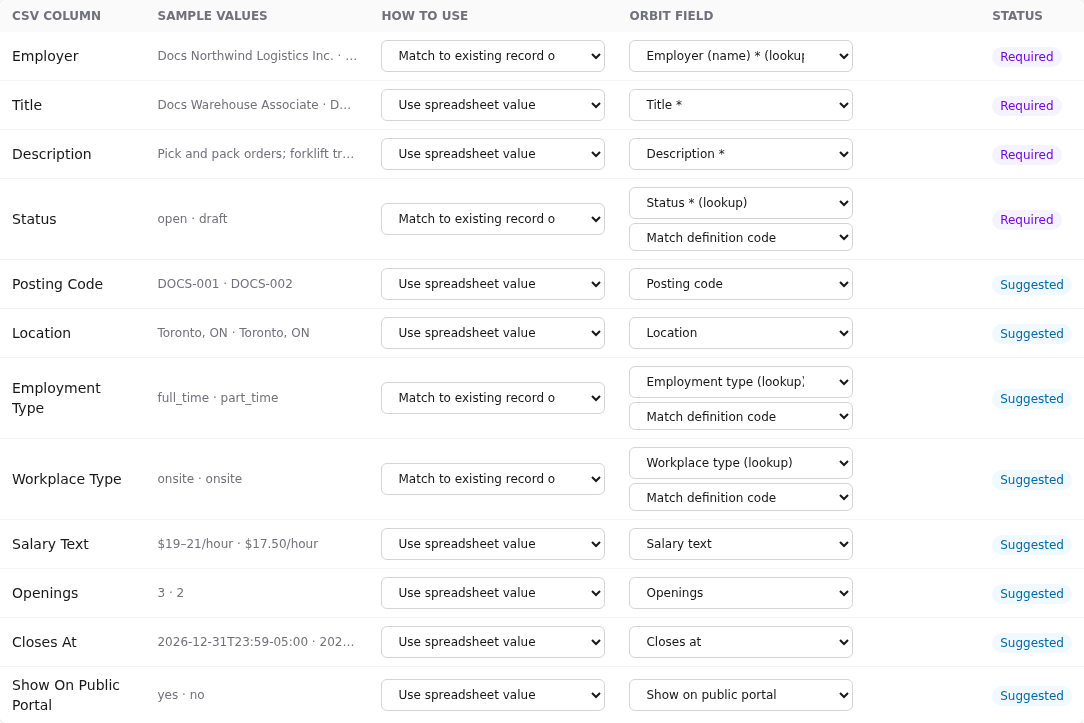
- Required: Employer, Title, Description, Status (
job_posting_status). - Lookups: Employment type, Workplace type, Category (
job_category). - Give every row a Posting code. It's how duplicates are matched and how job applications find the posting.
- Imported postings are not published, even with Show on public portal = yes. Edit each one and set Published at. NOC codes and tags aren't importable either; add them in the same edit.
Applicants and job applications
Step 1: Applicants (applicants.csv)
Person Email,Registration Status,Source,Work Authorization,Linked Client
carla.mendes@example.org,registered,walk_in,authorized,carla.mendes@example.org
- The person must exist (people import, client import, or a staff member).
- Linked Client (client email or number) connects the applicant to their client record.
Step 2: Job applications (job-applications.csv)
Applicant Email,Job Posting,Status,Stage,Applied At
carla.mendes@example.org,DOCS-001,new,submitted,2026-10-15T09:30-04:00
- Required: Applicant (email), Job posting (posting code or exact title), Status (
job-application-statuses). - Optional Stage (
application_stage) and Applied at. - Duplicates match on applicant + posting.
What imports don't do
Imports write records directly. Some things that happen when you create a record on screen are skipped:
| Record | Skipped on import | Do this afterwards |
|---|---|---|
| Cases | Case-number generation; status history entry; closed date stamping | Provide case numbers; set closed dates in the file (Closed at) |
| Job postings | Publishing date; NOC; tags; collaborators; classification policy checks | Edit each posting |
| Employers | NAICS; primary contact creation | Add NAICS; import contacts |
| Appointments | Conflict checks; recurrence; notifications; additional staff and resources | Review the calendar for clashes |
| Events | Public registration; resource bookings | Edit the event |
| Staff | Login account; availability resource | Add a user; set working hours |
| All | In-app notifications | – |
The audit log records the import job (who ran which file). Use the import's Details to see exactly which records each row created.